

21st Century Teacher Preparation Using VW

Prospective and veteran teachers have an opportunity to participate in a teacher preparation/training model using the virtual world of Second Life at West Virginia University.  The program at West Virginia University has found it to be particularly useful for math and physics training, an area of concern for schools across the US.

Universities in general seem to have explored VW technology more readily than the K-12 sector, perhaps the safety/security/liability concerns have something to do with it.  Their incoming students are over 18, certainly more tech-savvy than their predecessors, and professors are quickly becoming more digitally literate to support the student population they serve.  It seems that a pre-requisite for attending college today is a computer.  How this translates to the more cautious K-12 sector is still up to policy makers.  At the very least, the new teaching force will have a digital comfort and will use the digital environment to enhance their own content knowledge via learning strategies that seem to translate theory into application effectively.   The VW teacher preparation can also provide opportunities to learn teaching strategies that do not require digital methods.   Role playing in a “traditional classroom setting” can take place more frequently and without disrupting learning in an actual classroom.  Prospective teachers can pre-practice with avatars before actually practicing in an actual classroom with real children, thus honing skills and building confidence.

Change is not easy. Although K-12  teachers are currently using VW with their students for standards-based learning and 21st Century skill acquisition, the numbers are comparatively low.   Perhaps new teachers coming out of universities that use the technologies will help us to make some changes in the K-12 sector to update and benefit teaching and learning.

Beyond Powerpoint: 2D to 3D in Virtual Worlds

In an in-world presentation, Lesley Scopes aka Light Sequent presented ‘Learning Archetypes as tools of Cybergogy: A structure for eTeaching in Second Life to VWBPE 2010.  The presentation was worth watching  for the information that was presented, but of particular interest was the presentation method.  Lesley used 3D world tools to present rather than bringing the more frequently used 2D tool (PowerPoint) into the 3D world.  This made the presentation more engaging than presentations I typically attend.   The 3D models brought a unique physicality to the presentation that served to interest the audience.

A 3D representation is used to make a point

The presentation took advantage of tools not available in a 2D platform and perhaps demonstrates the evolution of 2D to 3D much like the evolution of overheads to PowerPoint was a few years ago.  Using the tools available in virtual worlds requires that the presenter have some skills in the area of building.  Light Sequent explained that the 3D items could contain scripts for additional interaction between audience and information 3D graphic. At the very least the presenter should be able to place the correct 3D object in front of the audience at the appropriate time but the actual building of the objects could be built by someone adept at building.

I look forward to using this method of presentation in the future, though I’ll need to label objects carefully so I don’t accidentally place a shoe or a silly gadget in front of my audience.

Gallery

The Value of Play

This gallery contains 4 photos.

Play connects us to others, fosters creativity, helps with social skills, motivates and increases cognitive growth, according to Vygotsky’s research on play.    We like to play and we learn from playing, so playing in a virtual setting seems to be logical enhancement … Continue reading

What’s the distinction between Protection from and Prevention of the Net?

The topic of safety on the Internet and protecting children from the perils of the Internet, as well as protecting organizations from possible lawsuits, have been coming up more and more frequently. A few years ago I would encounter the “ACCESS DENIED” screen not more than once every couple of months.  I would even have participants in a training purposely type in a URL that would produce that same screen, to demonstrate the effectiveness of the system keeping children secure and I would also report a site for needed blocking, if I stumbled upon something that was clearly inappropriate.   When encountering ‘the screen‘, I would continue with my work  and possibly check the source I was looking for after hours from my home computer.

Today I encounter the “ACCESS DENIED” screen several times a day and my colleagues report a similar experience.  The firewall is becoming a barrier to research, learning, collaboration and  innovation.  Now I contact the appropriate department requesting adjustment of the site I am trying to get to and  inevitably get the answer that “there is nothing that we can do – the School Board will not allow this site as it is classified as______”.  Are there more inappropriate sites than there used to be?  Are we blocking more than we used to?  Are we screening effectively?  Are we effectively teaching the appropriate use of the Internet?  Has the firewall become a replacement for teacher monitoring and supervision?  Is there a difference between social networking and professional networking?  How are social networking and social bookmarking the same/different?

The advent of social networking and virtual worlds used by the working world have caused me to ponder these questions and push back a little at our well-meaning and disciplined “Internet Police”.  I wonder if the fear of what students MAY encounter has caused us to prevent encounters that could be useful and educational.  Can social networking sites and working in virtual worlds positively impact collaboration and learning?
A government site, http://www.onguardonline.gov/, provides information for parents to know what to look for and to discuss with children regarding safety on the Internet, including social networking and virtual worlds.  Could this be curriculum material for educators to use?   In an ISTE 2010 address Mario Armstrong referred  to school districts blocking of the Internet as the  Locked Net Monster.  Check out the learning today blog for some ideas on teaching digital safety in a k-12 school setting.

I am not suggesting we unlock the firewall to all that is available, just a more thoughtful approach to what could be useful.  An approach that includes academic review, intellectual curiosity and alignment with 21st century skills.  The approach would require diligent supervision by teachers and appropriate preparation for use of the tool that has become ubiquitous, except in the classroom.  In the meantime I’ll do like the kids – use my smartphone, call a friend or wait until I get home to look it up.


From Virtual to Real- Second Life Community Convention Aug 13-15, 2010

Great to see that education and work with non-profits included in this real convention about the virtual world.  There are simultaneous RL and in-world meetings as well as great keynote speakers and SL musicians performing live – in RL.  I am hoping to be able to see recordings since Boston is not on my travel list this year.

Teaching Math in The Virtual World

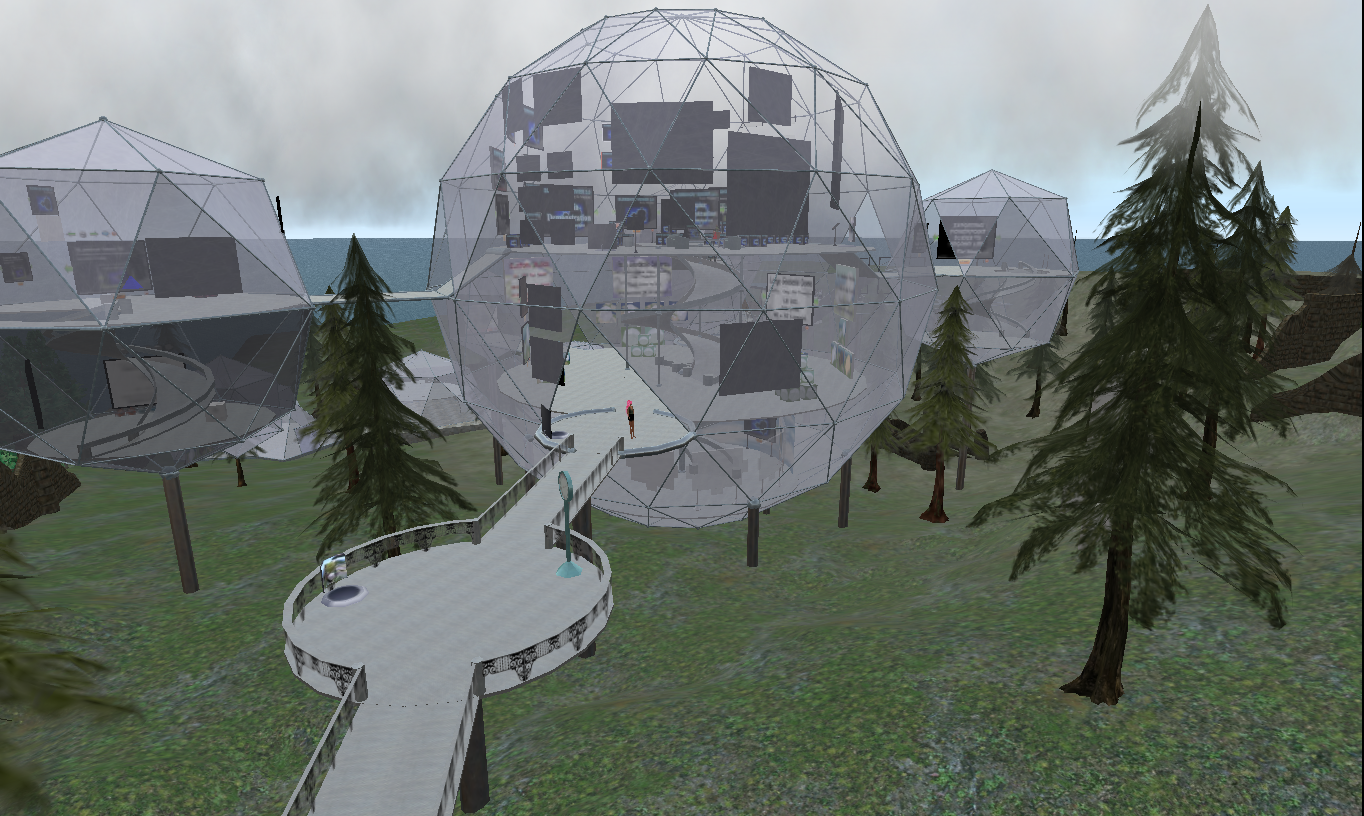
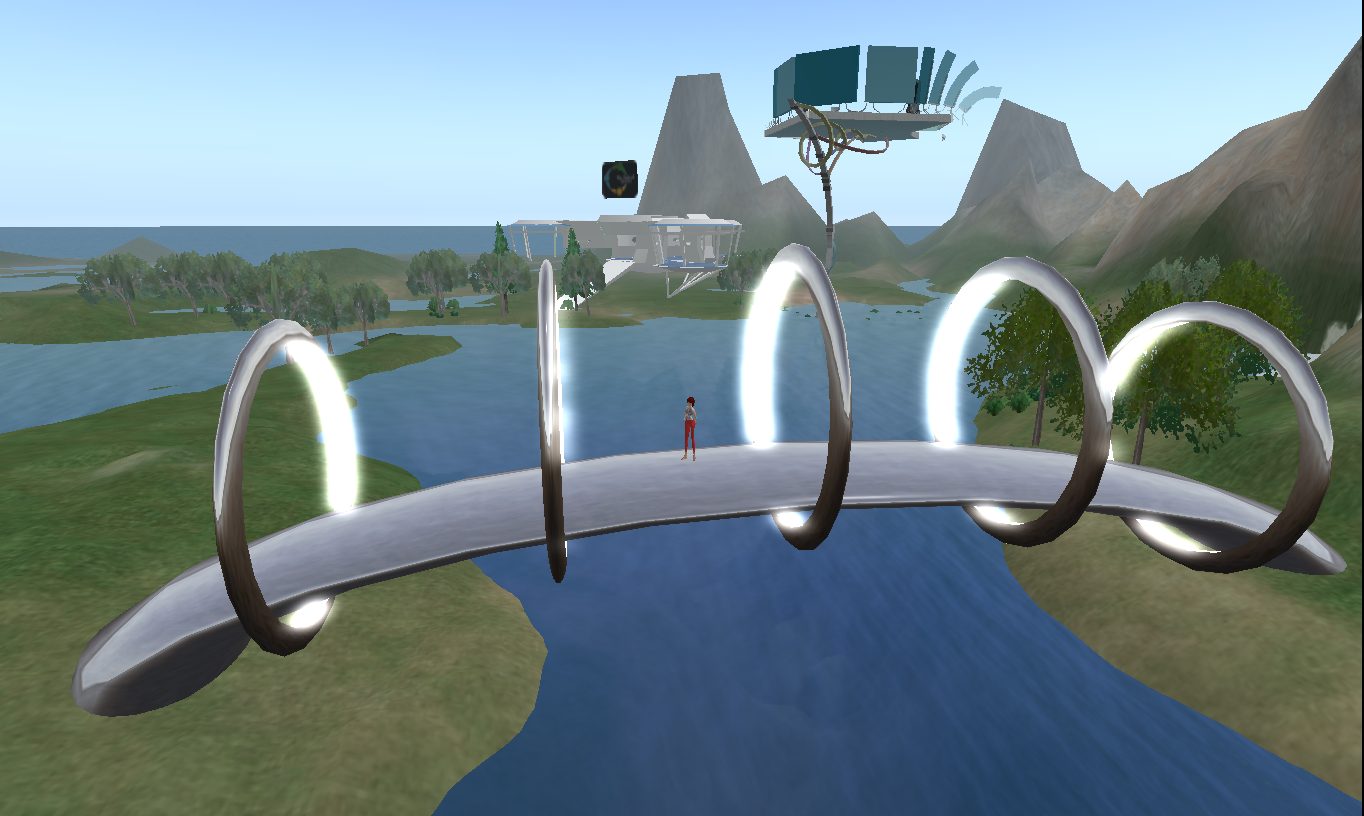
Mathematics may be one of the most obvious ways to use a virtual world for teaching and learning, particularly when students are in the building capacity.  Students can practice applying   mathematical concepts, while being creative and having fun.  Geometry comes alive as an avatar creates and moves 3D shapes around to construct a real or imagined structure, graphical representations are concrete rather than theoretical.

A geodesic structure in SL

A bridge in Reaction Grid

The tools in the virtual world are simple enough that even elementary school children can use them.   Learning to use these tools may even provide some preliminary knowledge and skills for future use of  more complex engineering CAD tools. Once the students create the shapes (which takes seconds) the 3D polygons can be moved about, enlarged or reduced in size, stacked, linked, rotated, twisted, tapered, even suspended in the air at the click of a mouse.  Students can adjust shapes and angles to fit ‘building blocks’ more precisely, they have the use of coordinates and measuring tools to support their building and learning.  The most important part is the process, not the final product, though the final product may contribute to discussion regarding the feasibility of the structures in real  life.  The process of building and solving the problems of fitting virtual shapes together to construct a planned structure is what makes students think and apply the mathematical concepts.

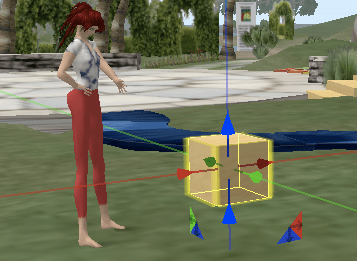
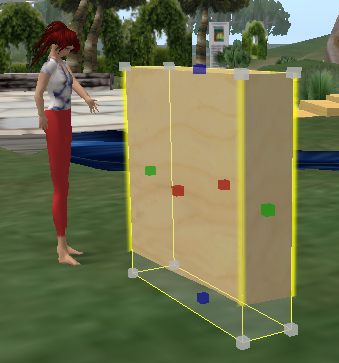
'Building' a block

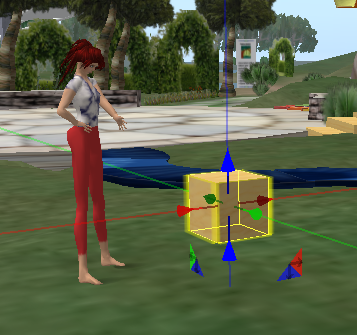
Adjusting dimensions of the cube.

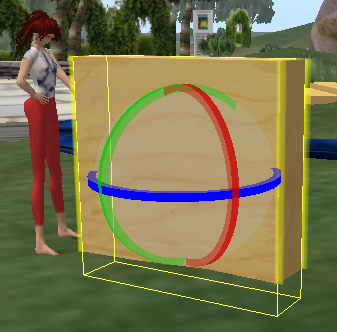
Rotating the adjusted cube.

Here an avatar creates a cube and then transforms it to a thinner taller rectangular shape, then rotates it to get it in the correct position.

The syllabus of an educational technology class at Boise State is an example of prospective teachers being provided an opportunity to learn  the skills necessary to use this medium for future instruction in K-12 classrooms.  There are multiple examples of K-12 teachers providing ‘building’ opportunities on the SL Teen Grid and on Reaction Grid  to their students. As these students apply mathematical concepts and address required standards they also practice some 21st Century skills such as innovation, collaboration and problem solving.


Virtual Visuals add to Authentic Engagement

The difference between participating in a cyber educational event via a webinar and one via a virtual world  is dramatic.  When I first started to explore the use of virtual worlds to determine potential use in education I asked, “why not just use an online meeting software package? A webinar allows voice, is in real-time, allows sharing and collaborating, includes chat and sidebar conversations as well as the benefits of not having to waste time in travel and logistics of a F-t-F event”.  The use of an avatar and mechanics of having to find the right outfit for her to wear, to have her transport, walk and sit in a virtual auditorium seemed a little silly.

Avatars attending a building Class at NCI on SL. Snoopy was a classmate.

Having participated in both types of events I can now say that, for me, the Virtual World experience is much more connected.  Even a ‘talking head’ presentation with a Powerpoint is more active in the 3D virtual world than participating in a 2D webinar.  I have observed that in a 3D environment the audience seems more likely to ask questions and provide commentary which adds to the information and addresses adult learning principles.  The chat texts I have saved from regular ISTE sessions are much longer and more interesting than the ones I have from Elluminate and Meeting-Place sessions I have attended.  They are also less formal, more natural.

When I attend a “flat” webinar I have a tendency to multi-task, to have the webinar on in the background while I do some other work at my desk.  Conversely, when sitting in an audience of avatars there is a feeling of presence.  I look around and see who else is there, I may chat with someone I know, introduce myself to someone I don’t know and contribute to the conversation in local chat for everyone’s benefit or chat privately on the issues being discussed.  I rarely do other work and concentrate on the topic at hand.   I am more engaged.

Virtual events that incorporate instructional strategies such as grouping participants, taking “field trips”, and interacting with content in the environment are even more engaging and push participants to participate.

A class getting ready to go on a field trip

The use of the virtual world medium is still evolving and it seems the majority of decision makers have yet to be convinced of potential educational merits.   I was not convinced until I had mastered some basic avatar communication and mobility skills and had participated several times in sessions that were of particular interest with skilled presenters.  I have paid more attention to the cartoons in virtual worlds than to an unattached voice and a whiteboard on my computer desktop.

Gallery

Can a Paracosm in a Virtual World Contribute to Creativity?

This gallery contains 6 photos.

According to a recent Newsweek article, The Creativity crisis, the Creativity Quotient (CQ) among American children has been dropping steadily since 1990.   This drop in CQ correlates with the exclusive focus on the teaching of standards and the preponderance of television … Continue reading

NASA STEM Challenge for Grades 9-12 InWorld

A competition from NASA provides a challenge for High school students, in 2 phases. In phase 1 students have an opportunity to work cooperatively, in teams of three-to-five students, as engineers and scientists to solve real-world problems related to the James Webb Space Telescope. Final solutions from this first phase of the challenge are due on Dec. 15, 2010.

Teams who complete Phase 1 are then paired with participating college engineering students for Phase 2, the InWorld phase of the challenge. Each InWorld team will refine designs and create 3-D models of the Webb telescope.

For more information about the challenge, visit http://www.nasarealworldinworld.org/.

Virtual Worlds Via the iPhone

Movement controls inworld on an iPhone

Accessing virtual worlds via the iPhone with Pocketmetaverse is possible but there are limitations. Yes, I do have the new iPhone 4 and yes I have downloaded an array of apps to test out my new toy. I have found that I can enter the virtual worlds of both Second Life and Reaction Grid, chat locally and in IM mode, teleport and be teleported, see what friends are online and view profiles, search for people and places, look through inventory, listen to media and even move my avatar, no flying.

the inworld view on an iPhone

The experience is somewhat outer-body, however. On the iPhone you cannot see the action, you cannot even see your avatar beyond a yellow dot among the green dots. A friend told me I was like a zombie, there but not there, not knowing when I was bumped and not being able to interact beyond chat. This access relegates the experience to a web social networking one.

The application is available on the iPad, I have not seen that one in action. If it is possible to view the visuals in the 3D worlds there could be some educational potential to interact in and to consume the virtual world, without that view the virtual world becomes a flat one.