The 1st Question 10 April 2011

My appearance on The First Question was an experience welcomed in order to better understand Virtual World possibilities for teaching and learning.  It was fun…but I do have to admit I was a little nervous, it was a “publicly broadcast” show.  Once I got over the very real feeling of “how do I look, how do I sound” I played my role and enjoyed the moment.  Implications for education are obvious.  Of course there is the game scenario with factual questions, a common strategy for quizzing and reinforcing curricular knowledge.  But more subtle was the actual experience that students could benefit from.  Essentially all the behaviors employed to make the show work; public speaking, taking part in a studio show with a live audience, following a set of rules, preparing, listening, being a cordial loser, being on time, following direction, collaborating and communicating effectively.  All skills and behaviors helpful in any workplace.  The one that really stands out is public speaking.  In all of our standardized testing of reading , writing , math and science – we never really assess public speaking.  Not that I advocate yet another test, but providing instruction and practice in this necessary skill is clearly lacking.  Just take a listen to some public figures, company chiefs, spokespeople and even some news reporters.  We often hear inadequate articulation of ideas, distracting verbal tics, and poor grammar.  So maybe a fun virtual TV show giving students a chance to play different roles, articulate ideas, converse with each other and instructors would provide some valuable practice in the language art we take for granted, speaking.

Vodpod videos no longer available.

Virtual Worlds as Part of a Transmedia Literacy Experience

Transmedia Storytelling is a strategy that uses current and emerging technologies along with traditional strategies to enable the participant to become immersed in a story to increase engagement and understanding.  Henry Jenkins, Professor of Communications, Journalism, Cinematic Arts, and Education at the University of Southern California, explains that “In transmedia, elements of a story are dispersed systematically across multiple media platforms, each making their own unique contribution to the whole.” It is a strategy that is used in the world of marketing and entertainment, still lagging in the education sector.

Telling stories across multiple platforms and formats addresses multiple learning modalities, encourages participation and motivates participants.  Stories are used to teach a wide variety of concepts at all levels of education.  A virtual world with a sim designed to draw students into a “game”  could potentially result in a high level of learning of a literary work, historical event, or scientific phenomenon.  The compelling attributes of transmedia storytelling are the capacity to engage participants and the capacity to promote creativity among the participants.  Engagement is crucial to meaningful learning and creativity is identified as a 21st Century skill necessary to solve problems and be competitive in a global environment.  As we look into school reform and teacher preparation for 21st Century schools it may be beneficial to ensure that teachers have some knowledge and skills in the the use of Transmedia storytelling.

Teaching and Learning Options in the Virtual World

The virtual environment offers students alternative ways of learning concepts.  Educators understand that differentiating instruction is important and that we should not limit ourselves to telling and explaining.  The information in a lecture or demonstration is magnified when students are given an opportunity to actively engage in an activity that provides a way for students to practice, apply or even play with the new content.  A community college professor demonstrates a virtual world activity designed to follow a lecture and provide  students a chance to “build a molecule” in virtual space.

Immersive Story Telling

Vodpod videos no longer available.

Machinima Learning at the VWBPE Conference 3/17-3/19

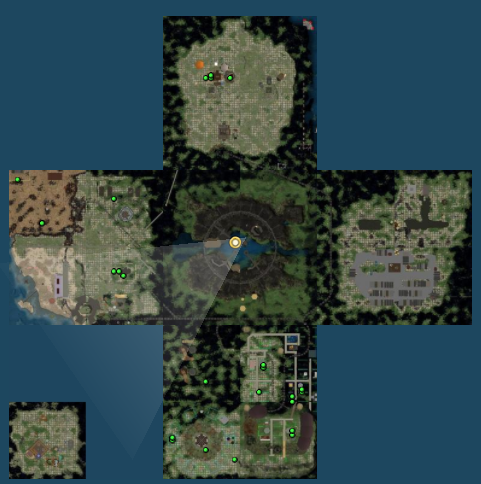
The VWBPE Conference has a number of events to support machinima endeavors for both novice users and experts.  The sessions are being held at different locations on the VWBPE 20 sims built in a Steampunk motif, just for this event.

20 Sim site on SL built specifically for the event 3/17-3/19.

March 17, 2011

March 18, 2011

East - Location of Screening of the VWBPE Machinima entries (popcorn is included)March 18, 2011

  • 3:00 – 4:00 PM SLT-  Machinima 4 Mere Mortals: Machinima Working Group – Intro. to Machinima East – EM 1/2
  • 3:00 – 4:00 PM SLT How 2 Use Machinima as Part of Your Class: East 1 – East 1/2 Teen Fair
  • 8:00 – 9:00 PM SLT-VWBPE Machinima Screening: East – EM 1/2

March 19, 2011

3 Days (53 hours) of Virtual Education Sharing

The VWBPE (Virtual World Best Practices in Education) Conference will be held in Second Life and other grids on March 17-19.  The Conference offers:

  • Theoretical and research presentations
  • Content-based describing the use of VW for teaching and learning
  • Workshops  offering technical guidance
  • Tours of virtual spaces used for education
  • Panel and roundtable discussions
  • Tools for both newcomers and experienced virtual world users
  • Game and simulation demonstrations
  • Poster presentations
  • Machinima screening and competition

Experienced virtual world participants will have the opportunity to learn and share with a global community of educators. This is also an opportunity for experienced users to introduce more reticent colleagues  to an environment that offers an alternative format for teaching and learning.

Teaching Strategies for Using Voice and Text in the Virtual World

The Internet is a text-rich environment, smart phone technology and social networking facilitate the use of text,  in a virtual world instruction can be provided in either text or voice mode and each has pros and cons.  Shambles Guru provides a useful video describing the setup of voice in Second Life using Viewer 2.

Text allows you to think about what you are communicating, seeing the written word allows for some processing and editing prior to clicking the send button.  Text can also be saved and referred to at a later time, always beneficial.  Text is the preferred method to communicate when language translation is required and the appropriate communication with hearing impaired students. The downside of text is that it is difficult to simultaneously demonstrate while communicating in text.  Another potential drawback is “text speak” and typos.  Though typically understood there is potential for misunderstanding and it develops a habit of ignoring typos and using abbreviations.  A class participant must be able to read and follow instructions in text.  This has potential for problems depending on the audience and individual capabilities.  Responding to individual questions in IM texting can be confusing (not seeing the message, having too many message boxes open, blocking view of the screen due to message boxes).

Voice allows an instructor to deliver a message the way that an instructor delivers in a real life classroom setting, a clarification is immediate and intonation is clear.  The lack of visual cues requires an instructor to use other methods to engage students and to ensure the message was delivered.  Ideally the students are also using voice so that 2-way communication can take place.  This requires an etiquette system of watching the screen for who is speaking, listening to the spoken text and speaking at a specific pause, so as not to interrupt the speaker.  It requires that the communicators listen more carefully than they may do in a real life classroom.   The teacher must also be watchful of students as they are performing particular tasks in the virtual setting.  The teacher needs to continuously move the camera around and watch students to ensure that students are performing tasks as directed, providing appropriate verbal direction as needed.

The ideal strategy is to use both text and voice.  This addresses various learning styles and takes advantage of the pros of each method, minimizing the cons.  This can be done is several ways.  The instructor can:

  • provide  notecards with vital information, in text, to supplement the spoken instruction.
  • type main ideas as he/she speaks.
  • have an assistant or student type the text as he/she speaks.
  • take advantage of the back channel in local chat to address questions

Teachers should practice the strategies in order to become comfortable and adept at using them, ultimately selecting which is most appropriate.

Gallery

Teaching as a Game Designer

This gallery contains 1 photo.

Teaching as a “performing art” has validity.  In the book with that title Seymour Sarason compares teacher preparation to performer preparation,  describing that a teacher must practice, be articulate, know the curriculum (script) and engage the audience. We all remember … Continue reading

Telling isn’t Teaching… in any World

A lecture hall filled with students and an instructor lecturing about a topic he/she knows very well does not guarantee learning is taking place, neither in real life nor in the virtual world.  Good teaching requires that the students do something in order to meet the objectives of the lesson.  Student engagement can range from taking notes and asking questions to discussing and working on an assignment that requires using information and skills. The level of engagement correlates with the learning that takes place.  The video below is one created by students at Elisabeth Morrow School in Englewood NJ.  Students undoubtedly learned more than the significance of Apollo as they interacted, on various levels, to create the video.  Additional work from middle school students at this school is posted on their wiki.

Some videos illustrating the concept of changing our teaching paradigm are Ken Robinson’s Changing Education Paradigms and  Dr Tae’s Building A New Culture of Teaching And Learning .   They are not short videos but definitely worth a watch…. and a share.  The men in these two videos describe eloquently how teaching needs to change in order to impact student learning, I suggest teaching in the virtual world should have a level of engagement similar to what they advocate.

Educators who have ventured into the virtual world have some innovation and sense of adventure to begin with – just by their presence.  Instruction in the virtual world must mirror that innovation by changing the paradigm, making sure that students (whatever their age) do more than “just sit there”.  Getting students to move into groups and perform activities in the real world requires classroom management skills, and an impact on space, time, and sound that could be disruptive if not handled with expertise.  The virtual world has these elements but   it is easier to move and alter the space, it takes less time, and sound can always be mitigated with individual headphones and microphones.  The part that takes some effort is ensuring a student focus. At the lowest level of engagement, the instructor should ask students/participants for feedback and then address the questions.  For more intense interaction and more learning the instructor can:

  • provide students with instructions to complete a task, either as individuals or in a group
  • have students present findings or completed tasks to the group
  • have students develop video clips and/or pictures of concepts to be shared on a common site

In either world,  the person doing the communicating is the person doing the learning.

Gallery

Build a Virtual Biome to Master Science Standards

This gallery contains 5 photos.

Environments in virtual worlds can be realistic or fantastical, each has benefits for students both as visitors and as creators.  National and state educational standards require that students can identify, describe and understand the differences in both land and water-related … Continue reading