
Advisory Panel to Offer Obama Ideas for Advancing STEM Education.
Tag Archives: Interaction

Machinima in Education
Creating films for learning is not new in K-12 education nor has the strategy been limited to magnet programs or exclusive schools that offer high-level technology classes and/or broadcasting. Teachers have used filmmaking as a way to help students learn … Continue reading
Social Learning in Immersive Environments
Much is discussed on the topic of Social Networking and the potential use of this technology in education. Research indicates that individuals benefit from a social approach to learning. L. Rendell et al. states that “Social learning (learning through observation or interactionwith other individuals) is widespread in nature and is centralto the remarkable success of humanity…” . Immersive environments have gained acceptance in post-secondary education for the past several years. VLearning: Is The Future Of Online Education A 3D Virtual Classroom? describes several studies that determined a positive correlation between the increased interaction among classmates and instructors in virtual classrooms and involvement in the course work and comprehension of material. It states, “… this to be particularly true for students who have a difficult time engaging in face-to-face discussions, but who will ask questions freely and contribute to live debates in a virtual classroom.”
In their book The New Social Learning Bingham and Connor devote a chapter to the topic of social learning in immersive environments, describing the successful uses in multiple corporate training programs. Social learning involves interaction, engagement and mutual exchange and benefit to participants.
The research on the successful use of immersive environments in professional development and post-secondary education are certainly reason to consider exploring these strategies in the K-12 sector.
Share this:
Architecture for the Virtual Environment
When people build in the virtual environment they create structures that resemble ones in the real world. Buildings, offices, houses, castles and classrooms have standard walls, doors, windows, and furnishings that replicate the real world. Perhaps it is because building what we are familiar with provides a frame of reference and feeling of comfort. In her blog, Avril Korman refers to Virtual World architecture as virtuatecture and discusses this desire for a home that looks familiar.
Virtual world “physics”, almost limitless creative possibilities, and avatar abilities suggest a more innovative architectural approach. Accommodating avatars who transport or fly in for a meeting requires a space that can be easily accessed with wide doorways, minimal walls or open rooftops. You can still have the familiarity of RL spaces with the added benefit of virtuatecture to accommodate the unique qualities and possibilities of the virtual setting.
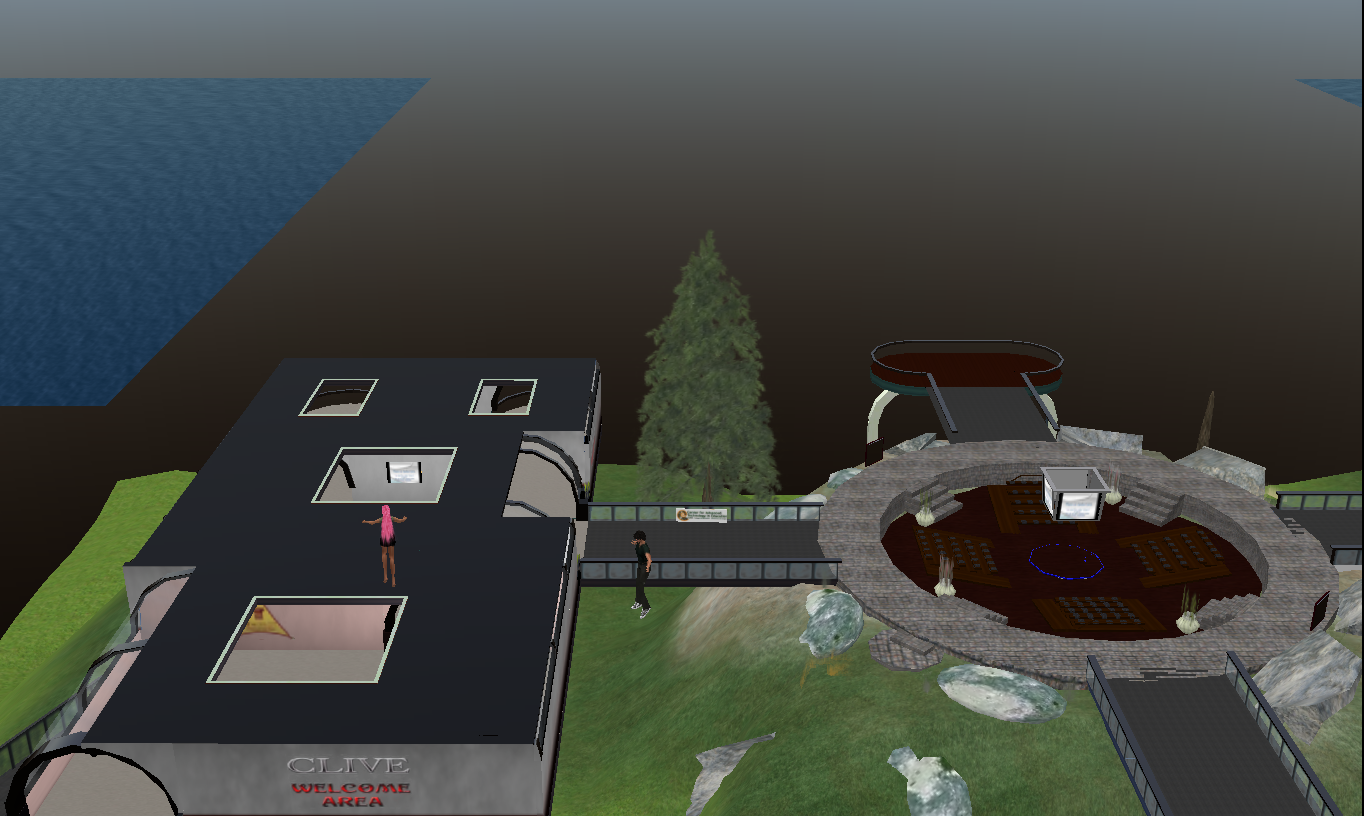
The rooftops at CLIVE in Second Life allow for easy access.
The buildings at CLIVE (Center for Learning in Virtual Environments) are generally standard looking buildings, with the exception of large openings in the rooftops for avatars to be able to fly in and exit easily.
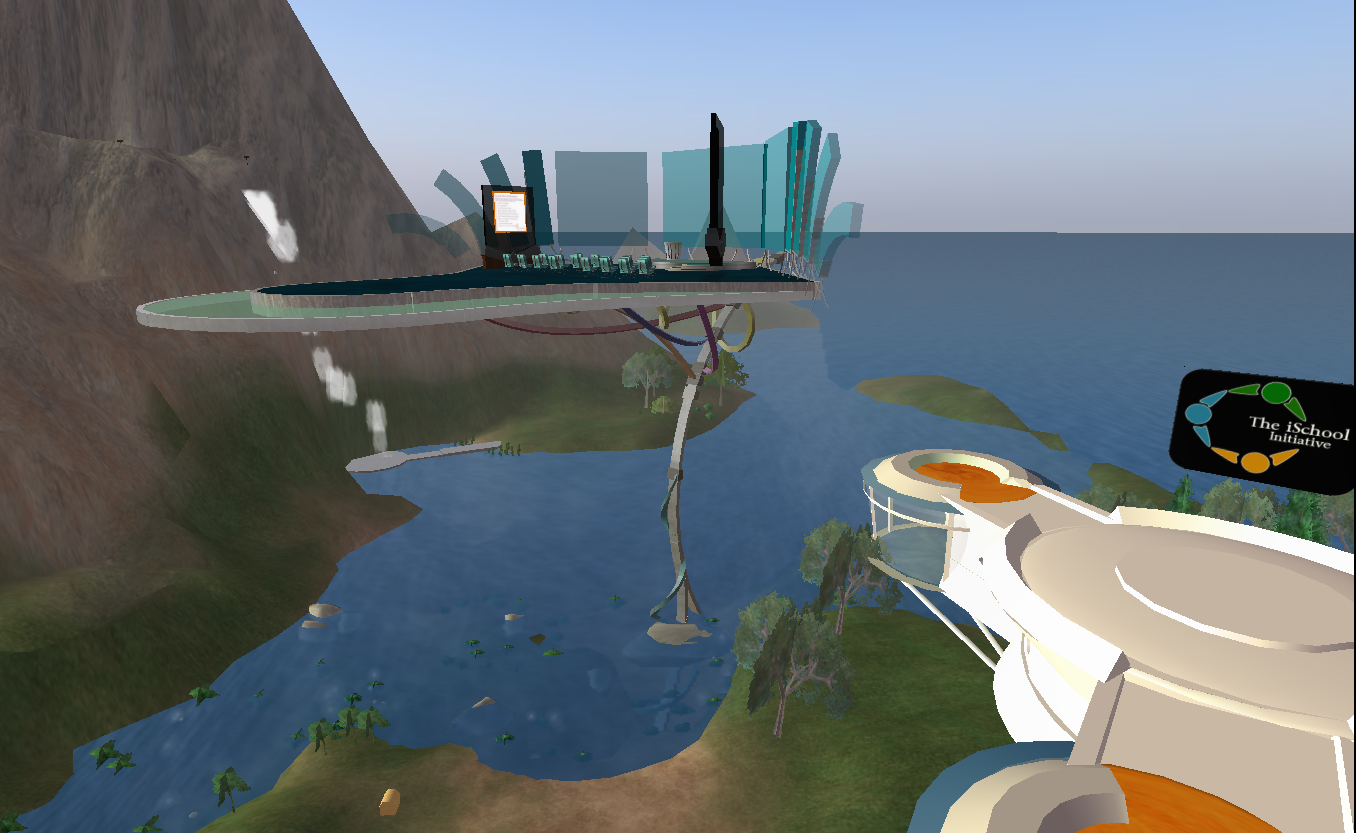
The iSchool classroom on Mellanium in Reaction Grid
The iSchool classroom on Reaction Grid is an open air classroom, easy to access via either a teleport or flying in, yet the space is somewhat traditional with the students desks in rows facing the instructor station and presentation area.
These two spaces illustrate the best of both worlds.

A wide ramp helps avatars to make their way into Gridizens market on Reaction Grid.
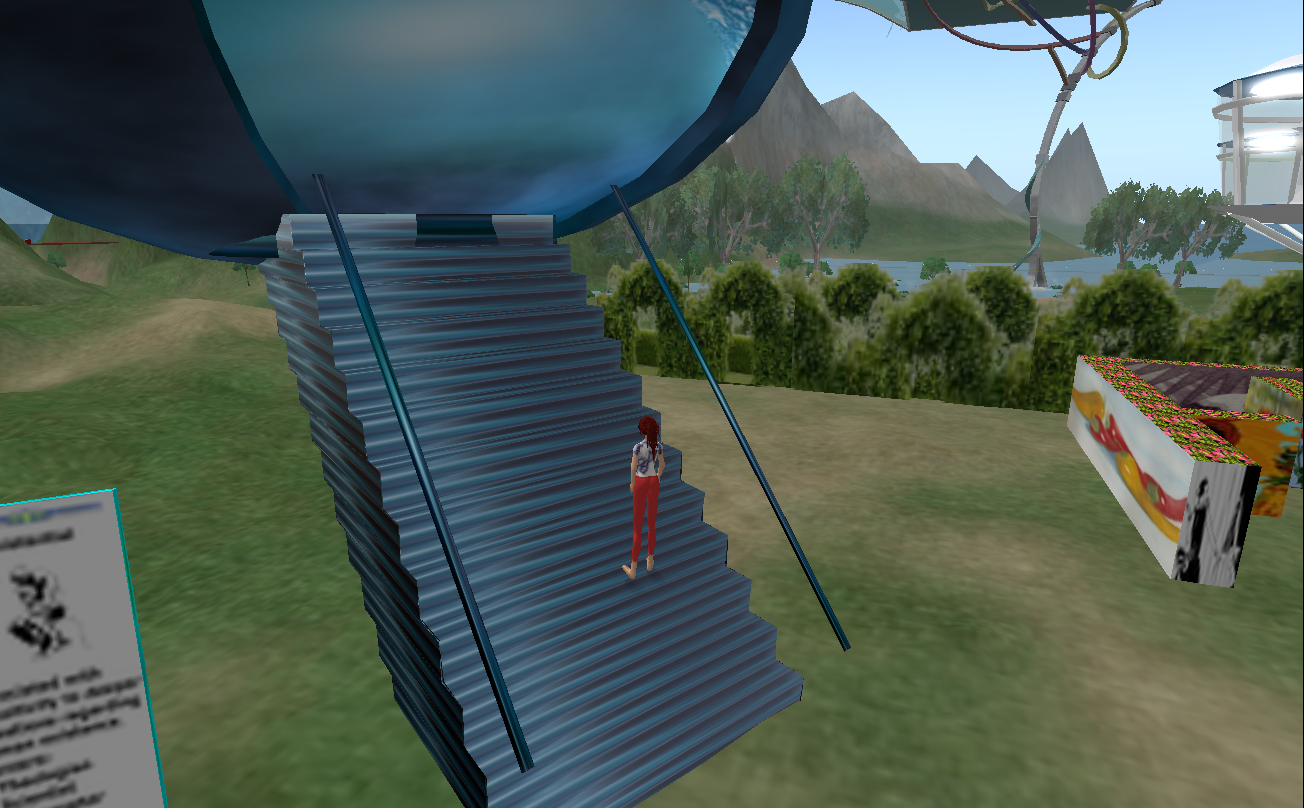
Rails keep an avatar from falling off a steep ramp.
Another feature to keep in mind is the ground (stairs/ramp) access to a facility. In real life we typically have stairs with a narrow ramp for wheelchair use. In a virtual setting avatars generally do better with wide ramps or rails with narrower ramps so they don’t fall off.
XSS Bucky Fuller on Mellanium in Reaction Grid and Museum of the Globe are two builds that take full advantage of the attributes of virtual environments. This virtuatecture looks unlike what we would encounter in the real world yet it works effectively in the virtual setting with large attractive spaces that can be reached via teleport and used in a variety of ways.

XSS Bucky Fuller in Reaction Grid

Museum of the Globe on Second Life
Share this:

Teen Grid Gone. What’s next in Virtual Worlds for Teen Students?
The recent announcement of the discontinuing of the Teen Grid on Second Life and allowing 16 and 17 year olds to register on the Second Life Main grid has sparked much conversation regarding digital responsibility and safety on the Internet and Virtual Worlds. In conversations with colleagues, educators using the Teen Grid, Second Life residents and students I have some thoughts about what could and maybe should happen.
Operating a secure closed grid was a complicated venture and educational organizations were not exactly flocking to take advantage, for several reasons. Costly fingerprinting and background checks for people who already have fingerprints and background checks, a reputation for adult content (despite the security and separate grid), and a general lack of knowledge and understanding of VW among educators were all barriers to taking advantage of the the Teen Grid.
One possibility now is for companies who are developing on Opensim or who have already developed Virtual Worlds with a more educational/student focus could fill the void. Reaction Grid and Kaneva are both viable possibilities. A safe environment designed for students under the age of 18 where student participation is monitored. Supervision is key, one educator told me that even on the Teen Grid students figured out how to smuggle in or create inappropriate content (just as they do in the real world).
The second possibility is to use the Main grid on second Life, not a possibility for my district. Certainly individuals under the age of 18 will now be allowed to register but a school district will not likely be convinced that the SL main grid environment is safe for students and there would be no liability issues. Students I have talked to about this tell me that “it is boring” and they would rather play World of Warcraft with a pre-defined objective, points and great graphics and action. Sims devoted to this type of activity may indeed draw some gamer youth, but not for educational purposes.

An electronic border is used to prevent an avatar from entering a restricted area.
If an educational institution does decide to go this route they could develop filters and restrictions to keep students in appropriate locations and to keep intruders out. Filters would need to be in place to prevent particular activity and content, possible but complicated.
It is a complex issue, one widely publicized, inappropriate event involving an underage person could set the entire focus of using these environments for purposes of education into a tailspin, not to mention what it could do to the student. Educators who are interested in and involved with using the virtual environment for education are clearly innovators and are working for the benefit of children. In their enthusiasm they must not forget safety and security of the students they teach and should ensure the teaching of digital responsibility to their students.
Share this:

Beyond Powerpoint: 2D to 3D in Virtual Worlds
In an in-world presentation, Lesley Scopes aka Light Sequent presented ‘Learning Archetypes as tools of Cybergogy: A structure for eTeaching in Second Life‘ to VWBPE 2010. The presentation was worth watching for the information that was presented, but of particular interest was the presentation method. Lesley used 3D world tools to present rather than bringing the more frequently used 2D tool (PowerPoint) into the 3D world. This made the presentation more engaging than presentations I typically attend. The 3D models brought a unique physicality to the presentation that served to interest the audience.

A 3D representation is used to make a point
The presentation took advantage of tools not available in a 2D platform and perhaps demonstrates the evolution of 2D to 3D much like the evolution of overheads to PowerPoint was a few years ago. Using the tools available in virtual worlds requires that the presenter have some skills in the area of building. Light Sequent explained that the 3D items could contain scripts for additional interaction between audience and information 3D graphic. At the very least the presenter should be able to place the correct 3D object in front of the audience at the appropriate time but the actual building of the objects could be built by someone adept at building.
I look forward to using this method of presentation in the future, though I’ll need to label objects carefully so I don’t accidentally place a shoe or a silly gadget in front of my audience.
Share this:

The Value of Play

This gallery contains 4 photos.
Play connects us to others, fosters creativity, helps with social skills, motivates and increases cognitive growth, according to Vygotsky’s research on play. We like to play and we learn from playing, so playing in a virtual setting seems to be logical enhancement … Continue reading
What’s the distinction between Protection from and Prevention of the Net?
The topic of safety on the Internet and protecting children from the perils of the Internet, as well as protecting organizations from possible lawsuits, have been coming up more and more frequently. A few years ago I would encounter the “ACCESS DENIED” screen not more than once every couple of months. I would even have participants in a training purposely type in a URL that would produce that same screen, to demonstrate the effectiveness of the system keeping children secure and I would also report a site for needed blocking, if I stumbled upon something that was clearly inappropriate. When encountering ‘the screen‘, I would continue with my work and possibly check the source I was looking for after hours from my home computer.
Today I encounter the “ACCESS DENIED” screen several times a day and my colleagues report a similar experience. The firewall is becoming a barrier to research, learning, collaboration and innovation. Now I contact the appropriate department requesting adjustment of the site I am trying to get to and inevitably get the answer that “there is nothing that we can do – the School Board will not allow this site as it is classified as______”. Are there more inappropriate sites than there used to be? Are we blocking more than we used to? Are we screening effectively? Are we effectively teaching the appropriate use of the Internet? Has the firewall become a replacement for teacher monitoring and supervision? Is there a difference between social networking and professional networking? How are social networking and social bookmarking the same/different?
The advent of social networking and virtual worlds used by the working world have caused me to ponder these questions and push back a little at our well-meaning and disciplined “Internet Police”. I wonder if the fear of what students MAY encounter has caused us to prevent encounters that could be useful and educational. Can social networking sites and working in virtual worlds positively impact collaboration and learning?
A government site, http://www.onguardonline.gov/, provides information for parents to know what to look for and to discuss with children regarding safety on the Internet, including social networking and virtual worlds. Could this be curriculum material for educators to use? In an ISTE 2010 address Mario Armstrong referred to school districts blocking of the Internet as the Locked Net Monster. Check out the learning today blog for some ideas on teaching digital safety in a k-12 school setting.
I am not suggesting we unlock the firewall to all that is available, just a more thoughtful approach to what could be useful. An approach that includes academic review, intellectual curiosity and alignment with 21st century skills. The approach would require diligent supervision by teachers and appropriate preparation for use of the tool that has become ubiquitous, except in the classroom. In the meantime I’ll do like the kids – use my smartphone, call a friend or wait until I get home to look it up.
Share this:
Virtual Visuals add to Authentic Engagement
The difference between participating in a cyber educational event via a webinar and one via a virtual world is dramatic. When I first started to explore the use of virtual worlds to determine potential use in education I asked, “why not just use an online meeting software package? A webinar allows voice, is in real-time, allows sharing and collaborating, includes chat and sidebar conversations as well as the benefits of not having to waste time in travel and logistics of a F-t-F event”. The use of an avatar and mechanics of having to find the right outfit for her to wear, to have her transport, walk and sit in a virtual auditorium seemed a little silly.

Avatars attending a building Class at NCI on SL. Snoopy was a classmate.
Having participated in both types of events I can now say that, for me, the Virtual World experience is much more connected. Even a ‘talking head’ presentation with a Powerpoint is more active in the 3D virtual world than participating in a 2D webinar. I have observed that in a 3D environment the audience seems more likely to ask questions and provide commentary which adds to the information and addresses adult learning principles. The chat texts I have saved from regular ISTE sessions are much longer and more interesting than the ones I have from Elluminate and Meeting-Place sessions I have attended. They are also less formal, more natural.
When I attend a “flat” webinar I have a tendency to multi-task, to have the webinar on in the background while I do some other work at my desk. Conversely, when sitting in an audience of avatars there is a feeling of presence. I look around and see who else is there, I may chat with someone I know, introduce myself to someone I don’t know and contribute to the conversation in local chat for everyone’s benefit or chat privately on the issues being discussed. I rarely do other work and concentrate on the topic at hand. I am more engaged.
Virtual events that incorporate instructional strategies such as grouping participants, taking “field trips”, and interacting with content in the environment are even more engaging and push participants to participate.

A class getting ready to go on a field trip
The use of the virtual world medium is still evolving and it seems the majority of decision makers have yet to be convinced of potential educational merits. I was not convinced until I had mastered some basic avatar communication and mobility skills and had participated several times in sessions that were of particular interest with skilled presenters. I have paid more attention to the cartoons in virtual worlds than to an unattached voice and a whiteboard on my computer desktop.
Share this:

Black and White or Shades of Grey
In the WSJ article on June 5, 2010 Does The Internet Make You Smarter or Dumber?, Clay Shirkey author of Cognitive Surplus: Creativity and Generosity in a Connected Age and Nicholas Carr author of The Shallows: What the Internet is Doing to Our Brains describe opposing viewpoints – who is correct? As usual, they are both right and wrong. I happen to agree more with Shirkey’s perspective but I have to acknowledge the research described by Carr. The bottom line is that it is a revolutionary time, the digital world has arrived and it is what we do with it that matters. There are always negative byproducts – we can’t stop innovation because of those – we need to learn to mitigate the negative while moving ahead with new developments, we simply cannot go back to the way things were.
To apply the title to the use of Virtual Worlds – Do Virtual Worlds Make You Smarter or Dumber? Well, again – it’s what you do with it. Some of it will be inane and meaningless and even bizarre, there are also positive aspects like collaboration, experiential learning, engagement, constructivism, improved communication, and motivation. As educators we need to take advantage of innovations and learn to use them to benefit our students. That means as educators we will need to learn to do things differently, to use these technologies to instruct, assist and guide our students. There are examples of this being done effectively. Those who are at the forefront have intellectual curiosity, a sense of adventure, and the realization that it is a different world than the one we were students in.
 Gridjumper's Blog