Animations Make it Real…sort of

A virtual world avatar wielding a sword and dropping unconscious is not unusual,  more subtle movements sometimes are.  Standing at a podium and moving hands during a speech, nibbling on an apple or just sitting in a natural pose bring an avatar to life and make for a more engaging experience for participants.  Virtual worlds supply your avatar with standard poses, these can be adjusted or you can make your own using Poser (for purchase) or  Qavimator    (PC) or (Mac) , a free animation creation software application.  I highly recommend Danish Visions on Second Life classes at  http://slurl.com/secondlife/Danish%20Visions/126/119/24).   Tempest Jarman teaches the QAvimator class in voice in a patient, organized manner.  She is clearly an expertise in the use of the QAvimator software.

I conducted a webinar in Adobe Connect recently and a participant gave me feedback saying that I “neglected to use the video capabilities and that would have provided some connection,  audio is not enough”.  In a virtual environment there is potential for auditory, textual, and visual cues to impart a message.  Creating animations and then making them available provides natural movements for students and instructors on a virtual world.  Adding the animations to a HUD gives the participant the ability to change an animation for emphasis and realism at a specific time. Subtle animations like raising a hand, applauding, leaning back in boredom or nodding can help to convey a message to others participating in an event. I am considering filming my virtual world avatar for the next webinar I facilitate, I figure it may help get their attention and it could be fun.

You can download the free QAvimator software at

(PC) http://www.qavimator.org/

(Mac) http://referencethis.com/QAvimator-osx-universal-svn-2008-12-06.zip

Skilled Teaching Works in All Worlds

I was curious about sculpting 3D objects and figured “I am capable, I can do this”.  I downloaded Blender, bought a book and made an attempt.  The multiple tools and buttons in the software were overwhelming and The first chapter of the book discussed how difficult Blender was to learn.  Time for Plan B.  I turned to a RL friend who is not a teacher but user of multiple 3D programs and talented artist in  multiple mediums.  I sat with him for about an hour and watched in amazement as he transformed ordinary spheres and cubes into something more interesting and asymmetrical, still I had no idea how to do it myself.  Fast-forward a few months when a friendly avatar invited me to come along to introductory sculpting class at the Danish Visions Class Group (http://slurl.com/secondlife/Danish%20Visions/126/119/24 ) in Second Life.   We had to hurry as “the room is locked after the lesson begins”, I was told, “and you can’t get in late”.

The Danish Visions Classroom space on SL

What a difference quality instruction makes.  Inge Qunhua, the Danish instructor provided the lesson in voice (in English), as well as in text for those who did not have audio capabilities.  She began the lesson with a quick reminder of classroom norms and  necessary materials with time to download Sculptypaint.  She then provided the objectives of the lesson and explained that at the end of the hour we would all have an individually designed comfy chair with rounded edges and a pedestal table. “A lofty goal – I’m a beginner”,  I was thinking, “how is this possible?”

With a minimized SL screen of Inge’s presentation and a working screen with Sculptypaint software I followed instructions, using a 15 inch laptop.  Inge monitored the students, corrected and provided feedback, and evaluated results.  At the end of the hour we had all met the objectives.

My newly constructed sculpty chair and table

Telling and  showing is not teaching, though it’s part of the process.  Good  teaching must include

• planning meaningful activities to meet objectives
• monitoring students as they practice until they reach a level of success
• explaining expectations and what success looks like
• evaluating results and providing feedback for improvement

The elements of this virtual world lesson included research-based effective teaching strategies and the results were evidence of capable instruction.

Value of Voice: Language Instruction in Virtual Environments

Learning a language is facilitated in a virtual environment with opportunities to use audio in a non-threatening venue, quickly change settings to encourage use of diverse vocabulary, and practice with native speakers from different geographic locations and accents.

The particular English Language class I observed took advantage of a traditional lecture and presentation board, using both the native tongue of the learners as well as the target language, English.  Students responded to questions in local chat providing the instructor an easy way to ascertain grasp of the topic.   One strategy that Alfonso Perfferle uses in his English for Spanish Speakers class on Second Life is to pair students and assign one member of the pair a note-card with questions associated with the topic or grammatical focus of the day.  Pairs of students then conduct a private voice call and practice speaking, using the note-card as a guide.  Text is available, as needed, for clarification.  The paired chat does not disturb other students and can be practiced and repeated in a trusting environment.  

Responses from students in local chat allows for quick formative evaluation.

In addition to the structured and more formal activity pictured here, this class of English Language learners logon from remote locations around the world to participate in "field trips" providing an opportunity to practice English in a variety of settings from shopping and restaurants to amusement parks and historic sites.  Time zones and physical locations are secondary factors in this particular classroom, the instructor is physically located in Miami, Florida while the majority of students are located in Spain.
 

Anatomy of a Lecture: Webinar vs VW Presentation

Although telling is not teaching there are reasons to present,  times when an expert  must provide information regarding a particular topic.  We’ve all attended lectures/presentations  and have had varying degrees of  learning from our attendance.

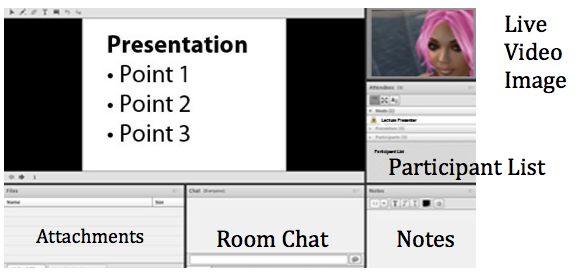
A typical Webinar session contains areas for presentation and interaction

The basic lecture in the digital age takes advantage of  digital presentation tools coupled with webinar/online presentation software.  The online meeting/webinar is a way to save time and money by providing a format allowing participants to logon to a website, and participate in a synchronous session with colleagues from remote locations.  The presenter and participants use audio and text, allowing for different modalities including side text conversations with colleagues without disrupting the general session.  Video is often available via webcam, typically a ‘talking head’.   The presentation is generally a PowerPoint or slide show with links and relevant documents provided.  In addition to the cost and time savings benefits, sessions can be recorded for future reference.

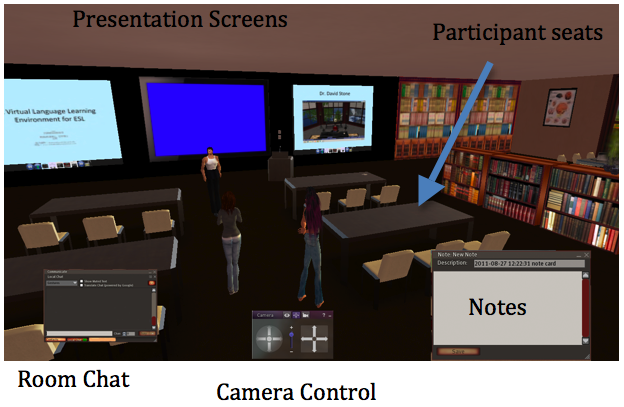
A Virtual World presentation contains areas for presentation and interaction

In a virtual world educational setting the lecture contains similar elements with some unique distinctions.  Again, text and audio communication abilities, note-taking,  recorded sessions and  non-disruptive side communications are the norm.  The obvious difference is visible in the comparison of the two screenshots posted here.  A virtual world provides a visual setting that is very much like a real world setting, though it could be placed in some extraordinary setting for added fun.  A camera control allows the participant to look around the room and zoom into  a presentation slide much like happens in a face-to-face presentation.  Attending a Virtual World presentation provides a “game” look and feel, considered by some as silly and unnecessary and by others as more engaging and natural.

Having attended both types of presentations I find them similar in the screen controls and options.  The engagement  factor is difficult to describe, best to experience it.  The virtual world method is a closer connection to real life presentation because of the visual setting, it does however require some skill and knowledge in computer interfaces and in many cases a special viewer.  There are some web-based virtual world settings, none are yet at the mobile device stage.  I’m guessing the technology will advance, bandwidth will improve and the two formats for delivering online synchronous presentations will meld bringing us the best of both.

Techplex Engineer describes the work of one of the teachers in a Summer Institute Course

Blurring the Lines Between Teacher and Learner

Techplex Engineer describes the work of one of the teachers in a Summer Institute Course

I was building on Reaction Grid and in need of a script so I looked at the map, located a couple of green dots and teleported over to request help. Techplex Engineer, an Anime-haired avatar greeted me cordially and immediately guided me to exactly what I was seeking.  Curious about the surroundings of the sim I had never seen, I inquired about the project and the blue haired Avi told me he was teaching teachers as part of a Summer Institute Outreach Program at the University of Maine’s School of Education.  The name of the Course was “Creating An Immersive Virtual Learning Environment“.

Part of the project from the Summer Academy was a World Religions Plaza for use with high school students.

My interest piqued, I continued to ask questions, finding my new virtual friend to be knowledgable and adept at explaining.  He provided pertinent web-sites, information about getting my mossy path to look seamless, and demonstrated layering of prims for particular effects.  Techplex explained that the teachers in the course were learning to build and use this environment to become “a new breed and begin to integrate this type of learning into their classrooms and to transform the classroom into a more stimulating and exciting way to learn”.  He was the co-instructor and “thankfully” not responsible for grading.

As is common in virtual environments, we exchanged ideas, discussed strategies and shared resources.  The chance encounter was worthwhile, helpful, and meaningful to me as a veteran teacher.  My new virtual colleague is a recent High School graduate on his way to the University this fall to major in electrical engineering.

Gallery

Supporting Learning Styles in the Virtual World

This gallery contains 2 photos.

Differentiating instruction includes supporting various student learning styles and is a challenge as teachers tend to teach in their own preferred style.  For the skilled instructor, using learning style models, personality indicators and/or intelligence inventories, Virtual Worlds can remove some limitations … Continue reading

Gallery

Living Literature in Virtual Worlds

This gallery contains 7 photos.

The use of Virtual Worlds to explore and enhance the literary experience is a useful activity for pre-reading, ongoing as a specific piece is read, and/or  as reinforcement after the reading is complete.    The value of a virtual world in … Continue reading

Middle School Students Build A Virtual World

The students in “Norma Underwood’s” class in an Arizona public school are building and scripting in a 3D environment, sculpting in Rokuro, collaborating on projects, and communicating with their peers and interested visitors.  I had the opportunity to visit Norma’s  virtual class space on Reaction Grid,  never having to leave my home state over 2000 miles away.  What a treat  to see 12 and 13 year olds assembling, communicating and cooperating in a medium that many are completely unaware of.

The class is an art class, lucky for these students they have a teacher who acknowledges and has taken the time to learn an art medium for the future.  The young architects and 3D artisans have used floor-plans to build 3D homes, decorated them and added items like video games and chess sets. Learning objectives  focus primarily  on standards in the area of art and mathematics. Additionally, Norma is incorporating 21st Century objectives like collaboration, communication and problem solving.  These are not as easily tested in the traditional assessments required by the state but obvious in the products the students have created and obvious as well when you watch them engaged in their work.

Teaching and Learning Options in the Virtual World

The virtual environment offers students alternative ways of learning concepts.  Educators understand that differentiating instruction is important and that we should not limit ourselves to telling and explaining.  The information in a lecture or demonstration is magnified when students are given an opportunity to actively engage in an activity that provides a way for students to practice, apply or even play with the new content.  A community college professor demonstrates a virtual world activity designed to follow a lecture and provide  students a chance to “build a molecule” in virtual space.

3 Days (53 hours) of Virtual Education Sharing

The VWBPE (Virtual World Best Practices in Education) Conference will be held in Second Life and other grids on March 17-19.  The Conference offers:

  • Theoretical and research presentations
  • Content-based describing the use of VW for teaching and learning
  • Workshops  offering technical guidance
  • Tours of virtual spaces used for education
  • Panel and roundtable discussions
  • Tools for both newcomers and experienced virtual world users
  • Game and simulation demonstrations
  • Poster presentations
  • Machinima screening and competition

Experienced virtual world participants will have the opportunity to learn and share with a global community of educators. This is also an opportunity for experienced users to introduce more reticent colleagues  to an environment that offers an alternative format for teaching and learning.